What Is a Hierarchy Chart?
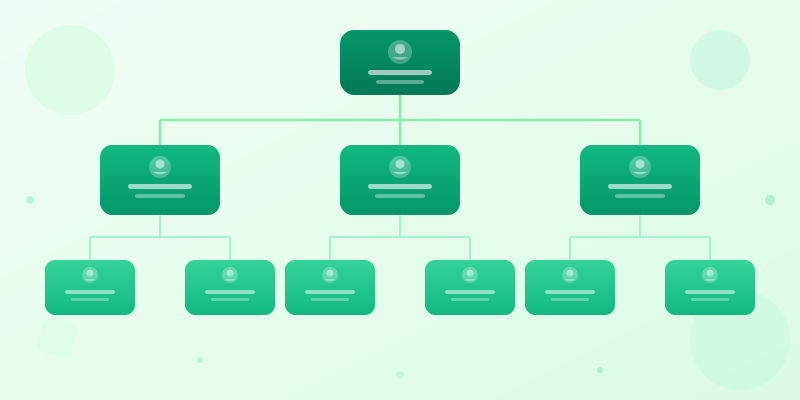
A hierarchy chart is a diagram that shows the ranked structure of an organization, system, or concept using a tree of connected nodes. The topmost node represents the highest authority or broadest category, and each descending level shows subordinates, subcategories, or components that report upward.
Hierarchy charts go by many names depending on the context: org charts for companies, taxonomy trees for classification systems, family trees for genealogy, and site maps for websites. The underlying structure is the same — a single root branches into children, which branch into grandchildren, forming a top-down tree.
Unlike flowcharts or process diagrams, hierarchy charts have no loops, no conditional branching, and no lateral connections. Every node has exactly one parent (except the root), and the relationship is always "reports to," "belongs to," or "is part of." This simplicity is what makes them instantly readable — anyone can trace a line from any node to the top and understand the chain of authority or classification.
When to Use a Hierarchy Chart
Organizational structure is the most common use case. When a new employee joins, an org chart answers "who do I report to?" and "who else is on my level?" faster than any onboarding document. Companies with 20+ people almost always need one, and companies with 200+ cannot function without one. Use org chart maker to build one quickly, or see how to make org chart for a detailed org chart guide.
Classification and taxonomy — biological classification (Kingdom → Phylum → Class → Order), product categories on an e-commerce site, file system structures, academic department breakdowns — all map naturally to hierarchy charts. Any time you need to show "this thing contains these sub-things," a hierarchy chart is the right tool.
Reporting and decision chains work well in hierarchy form. Who approves budgets over $50K? Trace the chart upward from the requesting department. Who owns the mobile app codebase? Follow the engineering branch down. Hierarchies answer "who is responsible?" questions at a glance, which is why they show up in compliance documentation, project governance frameworks, and military command structures.
If your data has lateral relationships (peer-to-peer connections, cross-team collaborations, many-to-many mappings), a hierarchy chart is the wrong tool. Use a network diagram, mind map, or matrix instead. Hierarchies are strictly top-down.
How to Build a Hierarchy Chart Step by Step
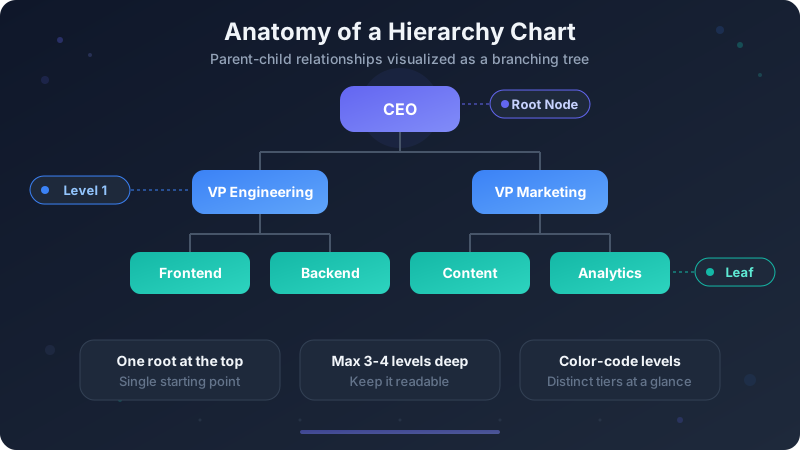
Start at the top. Identify the single root node — the CEO, the broadest category, the top-level concept. Everything else in the chart exists beneath this node. If you cannot identify one clear root, you may be looking at multiple hierarchies that should be separate charts.
List the direct children of the root. In an org chart, these are the C-suite or department heads. In a product hierarchy, these are the top-level categories. Aim for 2-7 children per node — fewer than 2 means the parent is unnecessary, and more than 7 becomes visually cluttered and suggests a missing intermediate level.
Repeat for each child: who or what reports to this node? Continue until you reach leaf nodes — positions, items, or concepts with nothing beneath them. For most organizations, 3-4 levels is sufficient. Going deeper than 5 levels usually means the chart needs to be split into sub-charts.
Open hierarchy chart maker to build your chart interactively — add nodes, define parent-child relationships, and see the tree rendered instantly. For complex hierarchies with custom styling, icons, and annotations, use the full editor where you can combine the hierarchy widget with stat cards, text blocks, and other widgets.
Types of Hierarchy Charts
Organizational hierarchy charts (org charts) show reporting structure within a company. Nodes typically contain a person's name, title, and sometimes a photo or department color. These are the most common hierarchy charts and the ones most people picture when they hear the term. Build one with org chart maker.
Family trees are hierarchy charts that show genealogical relationships. The root is either the oldest known ancestor (top-down) or the subject person (bottom-up, sometimes called a pedigree chart). Family trees often span many more levels than org charts and may include dates, locations, and relationship annotations.
Classification hierarchies organize items into categories and subcategories. Examples: biological taxonomy (Life → Domain → Kingdom → Phylum → ...), library classification systems (Dewey Decimal), product catalogs (Electronics → Computers → Laptops → Gaming Laptops), and file directory structures. These charts tend to be wider than they are deep.
Product and feature hierarchies break down a product into its components or a service into its features. Software teams use these to show module dependencies, product managers use them to map feature sets, and manufacturers use them for bill-of-materials breakdowns. Each node represents a component, and children are sub-components.
Decision and authority hierarchies show who has the power to approve what. These are common in governance frameworks, compliance documentation, and military command structures. Nodes represent roles or committees, and the vertical position indicates authority level. Unlike decision trees (which show questions and outcomes), authority hierarchies show static reporting chains.
Ready to build?
Open the free editor and start creating — no signup needed.
Hierarchy Chart Best Practices
Keep it to 3-4 levels. A hierarchy chart with 7 levels of depth is technically correct but practically useless — nobody can trace a path through that many layers at a glance. If your organization or taxonomy is deeper, break it into multiple charts: a high-level overview and detailed sub-charts for each branch.
Limit children per node to 2-7. A node with 15 direct children creates a chart so wide it cannot fit on a screen or a printed page. If a manager has 15 direct reports, consider whether some of those reports should be grouped under team leads. The chart reflects reality, but it can also reveal organizational problems.
Use consistent node sizes and spacing. Every node at the same level should be the same width and height, with equal horizontal spacing. Inconsistent sizing implies that some nodes are more important than others at the same rank, which confuses readers. The hierarchy chart maker handles this automatically.
Color-code by level, department, or category. A single color for all nodes is functional but bland. Using a different hue for each level (like the indigo-blue-teal scheme in the diagram above) makes the depth immediately visible. Alternatively, color by department or category to show groupings within the same level.
Label relationships when they are not obvious. In a standard org chart, the lines mean "reports to" and everyone knows it. In a product hierarchy, the lines might mean "contains" or "depends on" — add a small legend or annotation so readers do not have to guess. A single line of text ("reports to" or "is part of") near the top of the chart is enough.
Common Hierarchy Chart Mistakes
Multiple roots. A hierarchy chart must have exactly one root node. If you have two CEO nodes, two top-level categories, or two "starting points," you have two separate hierarchies. Combine them under a true root (like "Company" above two divisions) or create two charts.
Skipping levels. If the CEO connects directly to an individual contributor while also connecting to VPs, the chart implies that the IC has the same rank as the VPs. Either add the missing intermediate levels or use a dotted line to indicate a special reporting relationship (like a direct advisory role).
Making it too detailed. An org chart that includes every intern and contractor becomes a sprawling mess that is outdated the moment someone leaves. For most audiences, showing down to the team-lead or manager level is sufficient. Create detailed sub-charts only for teams that need them.
Ignoring the horizontal dimension. Placing all children in a single vertical column makes the chart look like a list, not a tree. Spread children horizontally at each level to use the visual space effectively. If horizontal space is limited, consider a radial or indented-list layout instead of forcing a cramped top-down tree.
Forgetting to update. Hierarchy charts rot faster than any other diagram because people join, leave, and change roles constantly. If your chart is more than 3 months old, verify it before sharing. Stale org charts actively misinform — they are worse than no chart at all.
Create Your Hierarchy Chart with GraphMake
Open hierarchy chart maker to start building immediately. Add your nodes, define parent-child relationships, choose a color palette, and download as PNG — free, no signup, no watermark.
For full creative control, click "Customize in Editor" to open the hierarchy in the editor. Add department colors, icons, photos, stat cards, and any of our 60+ widget types. Combine your hierarchy chart with process diagrams, comparison bars, and text blocks to build a complete organizational infographic.
Browse templates for pre-designed layouts that complement hierarchy charts — project proposals with team structures, annual reports with department breakdowns, and business dashboards that combine org charts with performance metrics.