For Claude, Codex, Cursor and other AI agents
GraphMake MCP server
Your AI agent writes the infographic and GraphMake draws it, as a PNG or SVG it can save or show you. Connect it once with the URL below. Free, no API key, no account.
Server URL
https://graphmake.com/api/mcpRun this once in your terminal. Add --scope user to use it in every project.
claude mcp add --transport http graphmake https://graphmake.com/api/mcpThen just ask
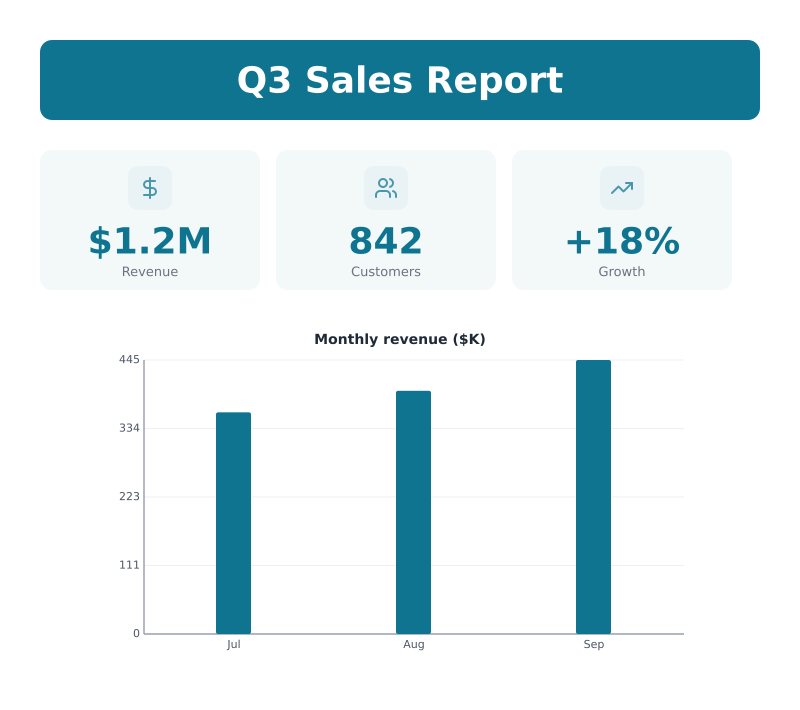
- “Make an infographic of our Q3 numbers: revenue $1.2M, 842 customers, +18% growth, monthly revenue 360, 395 and 445K.”
- “Read sales.csv and turn the monthly totals into a bar chart I can paste into the README.”
- “Draw our hiring process as a 5-step process diagram and save it as SVG.”
What your agent gets back
This came straight from the server for the first request above: a 10-line script the agent wrote, rendered in under a second.
Tools
- render_infographic
- Turns GraphMake Script into a PNG or SVG, with a link to edit it in GraphMake.
- graphmake_script_reference
- The full syntax, so the agent knows every chart and layout it can use.
- open_in_editor
- A link that opens the infographic in the GraphMake editor to restyle and export.
What it can draw
Numbers and text
- Titles
- KPI cards
- Big numbers
- Text
- Quotes
- Lists
- Ratings
Charts
- Bar
- Line
- Area
- Pie
- Donut
- Radar
- Progress bars
- Percentage rings
- Gauges
- Waffle
- Word cloud
Layouts
- Timelines
- Process steps
- Funnels
- Pyramids
- Cycles
Maps
- World map shaded by value
The agent writes these in GraphMake Script, a short text format with 15 colour themes and sizes for posts, slides and print.
Questions
Is it free?
Yes. No account and no API key. Each IP address can render 30 images a minute and 500 a day.
Do you keep what my agent sends?
No. Renders are not saved. We log which tool was called and whether it worked, not the content.
Which AI tools work?
Any client that supports remote (Streamable HTTP) MCP servers: Claude Code, Codex, Cursor, VS Code, the Claude app and others. You only need the URL.
Can I change the result by hand?
Yes. Every render comes with a link that opens it in the free GraphMake editor, where you can restyle it and export PNG, SVG or PDF.
Is there a plain HTTP API?
Yes: POST a script to /api/render-script and get an SVG or PNG back. See the GraphMake Script page for examples.
Server URL: https://graphmake.com/api/mcp (Streamable HTTP, no auth).