What Is a Mind Map?
A mind map is a diagram that starts with a central idea and branches outward into related topics, subtopics, and details. Unlike linear notes or bullet lists, a mind map mirrors how your brain actually works — through associations and connections rather than strict sequences.
Tony Buzan popularized mind maps in the 1970s, but the concept is much older. Leonardo da Vinci used branching diagrams in his notebooks. The reason the format has lasted centuries is simple: it works. Seeing ideas spread out radially helps you spot connections, gaps, and patterns that disappear in a flat list.
Mind maps are used everywhere — project planning, study notes, meeting agendas, content strategy, brainstorming sessions, book outlines, and decision-making. If you've ever scribbled ideas on a whiteboard and drawn lines between them, you've already made a mind map.
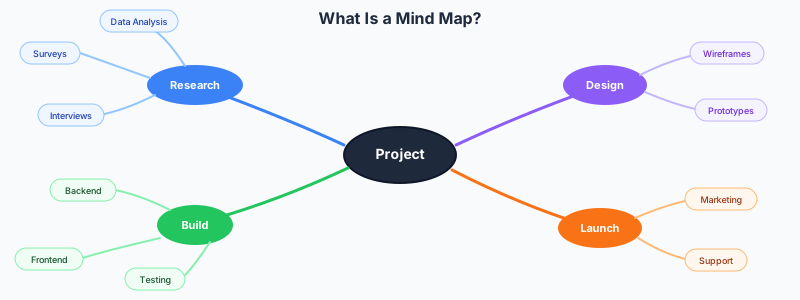
When to Use a Mind Map vs Other Diagrams
Mind maps work best when you need to explore an idea without committing to a structure upfront. They're for divergent thinking — expanding outward from a starting point to see what's connected.
If your process is sequential (step 1 then step 2 then step 3), use a process diagram or flowchart instead — try flowchart maker or process diagram maker. If your information is chronological, a timeline is a better fit (timeline maker). If you're comparing two options side by side, a comparison chart is clearer (comparison maker).
Use a mind map when you're starting from scratch and don't know what the structure should be yet. Planning a project? Start with a mind map to identify all the moving parts, then convert the branches into a timeline or flowchart once the structure is clear.
Step 1: Start With One Central Idea
Every mind map begins with a single concept in the center of the canvas. This is your anchor — everything else radiates from it. Make it specific enough to be useful but broad enough to branch.
"Marketing strategy" is too vague. "Q3 marketing plan for product launch" is better. "Content ideas" is too open-ended. "Blog topics for developer audience" gives you a direction.
Write the central idea in the middle and make it visually prominent — larger text, a bold color, maybe a shape around it. This isn't just aesthetic. It signals to your brain that this is the starting point, and everything else supports it.
Step 2: Add Main Branches
The first ring of branches represents your major categories or themes. These are the big buckets that divide your central idea into manageable chunks. Aim for 4 to 7 main branches — fewer feels underdeveloped, more starts to overwhelm.
For a "Q3 marketing plan" mind map, your main branches might be: Content, Paid Ads, Email, Social Media, Events, and Partnerships. For "biology exam review," they might be: Cells, Genetics, Ecology, Evolution, and Anatomy.
Give each branch a different color. This isn't decoration — color coding helps you visually group related ideas and scan the map quickly. GraphMake's built-in palettes make this easy. For help choosing colors that reinforce meaning, see color psychology infographics.

Step 3: Expand With Sub-Branches
Now go deeper. Each main branch splits into sub-branches with more specific topics. Under "Content" you might have: Blog Posts, Case Studies, Video Tutorials, Whitepapers. Under "Blog Posts" you might have specific article ideas.
This is where mind maps earn their keep. As you branch out, you'll start seeing connections between different areas. Your "Case Studies" sub-branch might connect to "Partnerships" because partner success stories are case studies. That cross-connection is an insight you wouldn't get from a linear list.
Don't overthink the hierarchy. If you're not sure whether something is a main branch or a sub-branch, just put it down. You can reorganize later. The goal at this stage is getting everything out of your head and onto the canvas.

Step 4: Add Details and Keywords
The outermost layer of your mind map contains specific details — names, numbers, deadlines, notes, and keywords. Keep these short. A mind map node should be 1-5 words, not a paragraph.
"Blog post about CI/CD best practices — publish by March 15 — assign to Sarah" is too much for one node. Break it into three: the topic on one node, the date on another, and the assignee on a third. Each piece of information gets its own branch.
Use icons or small images where they add clarity. A calendar icon next to a deadline, a dollar sign next to budget items, a warning symbol next to risks. Visual cues help you scan the map faster than reading every label.
Ready to build?
Open the free editor and start creating — no signup needed.
Step 5: Review and Reorganize
Step back and look at the full picture. This is the moment mind maps deliver their real value — the bird's-eye view. You'll likely notice imbalances: one branch has 15 sub-topics while another has two. That tells you something. Either you need to research the thin branch more, or the heavy branch should be split into multiple main branches.
Look for connections between branches. Can any sub-topics be grouped differently? Are there duplicates? Is anything missing? Draw cross-links between related nodes that sit on different branches — these connections often surface your most creative insights.
Prune ruthlessly. If a branch doesn't support your central idea, remove it. A focused mind map with 25 nodes is more useful than a sprawling one with 80.
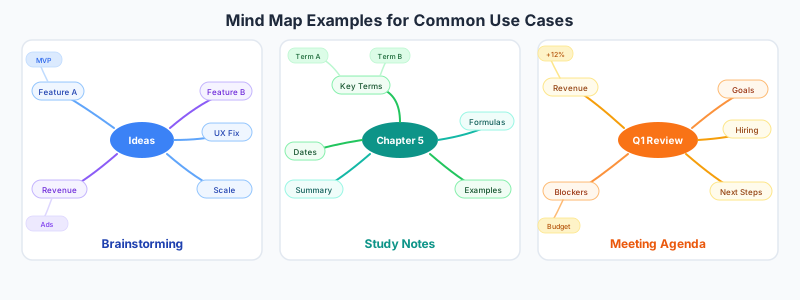
Mind Map Examples for Common Use Cases
Project planning: Central idea is the project name. Main branches are phases (Discovery, Design, Development, Testing, Launch). Sub-branches under each phase list tasks, owners, and deadlines. This gives the whole team a visual overview before you move things into a project management tool.
Study notes: Central idea is the subject or chapter. Main branches are key concepts. Sub-branches are definitions, formulas, examples, and connections to other concepts. Research shows that students who use mind maps retain 10-15% more than those who use linear notes — the spatial layout creates stronger memory associations.
Content strategy: Central idea is your audience or product. Main branches are content types (blog, video, social, email). Sub-branches are specific topics, keywords, and publication dates. The visual layout helps you spot gaps in your content calendar and ensure balanced coverage across channels.
Meeting preparation: Central idea is the meeting topic. Main branches are agenda items. Sub-branches are talking points, questions to raise, and decisions needed. Walking into a meeting with a mind map instead of a bullet list helps you stay flexible — if the conversation shifts, you can follow a different branch without losing track.
Mind Map Design Tips
Use a radial layout. The classic mind map radiates outward from the center in all directions. This isn't just tradition — radial layouts give each branch equal visual weight and prevent the map from becoming a lopsided tree. GraphMake's mind map widget handles this layout automatically.
Keep nodes short. Single words or short phrases work best. "Customer acquisition cost" not "The total cost of acquiring a new customer including marketing and sales expenses." If you need that detail, it belongs in a document, not a mind map.
Vary the visual hierarchy. Main branches should be thicker, bolder, and more colorful than sub-branches. The outermost detail nodes should be the smallest and lightest. This creates a natural reading order — central idea first, then major themes, then details.
Limit depth to 3-4 levels. Central idea → main branch → sub-branch → detail. If you need more depth, your mind map is probably trying to be an outline. Consider creating separate mind maps for the complex branches.
Common Mind Mapping Mistakes
Writing sentences instead of keywords. A mind map covered in full sentences is just a badly formatted document. Each node should be a trigger word that reminds you of the full idea — not the full idea itself.
Too many main branches. If you have 12 main branches, the map becomes a starburst that's impossible to read. Group related ideas under broader themes to keep main branches between 4 and 7.
Ignoring cross-connections. The branches of a mind map aren't independent silos. The best insights come from noticing that a sub-topic under "Marketing" relates to one under "Product Development." Draw those connections explicitly.
Making it too neat on the first pass. Your first mind map should be messy. That's the point — you're brainstorming, not presenting. Clean it up after you've captured everything. Perfectionism during creation kills creativity.
Build Your Mind Map in GraphMake
Open the mind map maker and start building your mind map immediately — no signup required. Add your central idea, create branches and sub-branches, and customize colors and fonts to match your style. The tool handles the radial layout so you can focus on ideas, not positioning.
Want to include your mind map in a larger infographic? Open the full editor and add a Mind Map widget alongside stat cards, charts, timelines, and other widgets. Combine your brainstorming diagram with supporting data for presentations, reports, or study guides.
Export as PNG when you're done — free, no watermark. Your mind map is ready for presentations, team documentation, study sessions, or wherever you need to organize and communicate ideas visually.