Free Poster Maker & Template Gallery
Infographics & ContentDesign posters online in minutes — click any text on the poster and type. Pick a type, theme, and layout, customize colors, export as PNG — free, no signup, no watermark.
Free PNGNo signupNo watermark
Loading tool...
Was this tool helpful?
Watch the Tutorial
Type headline, date, venue and call to action on the poster itself, try six arrangements that each change what dominates, then export at a real print size: A3, A4, US Letter or 18x24.
Want more customization?
Open the full editor with 80+ widgets, templates, and AI generation.
How to Use
- 1
Pick a starting point
Browse /templates for a pre-designed poster template, or start from a blank size here.
- 2
Choose a size
Portrait A3 (794×1123), landscape 16:9, square (social), or tall Pinterest. Custom sizes available in the full /editor.
- 3
Add your content
Headline, subtitle, body, and any charts, stats, or icons. Replace template placeholders with your own copy.
- 4
Style it
Pick from curated palettes (dark, warm, forest, royal, minimal, coral) or open the full editor for custom colors and nearly 80 fonts.
- 5
Export
Download PNG — free, no watermark. Pro adds SVG and HD PNG. For a PDF, click Customize in Editor and export PDF from the full editor.
Why Choose GraphMake?
Poster Maker or Poster Template — What is the Difference?
Two paths to the same result. A poster maker is a blank-canvas tool where you design from scratch. A poster template is a pre-designed starting point where you swap in your content. Both end with a poster; the difference is where you begin.
Templates win when speed matters and one of them fits your use case. The hierarchy, proportions, and color palette are already decided, which is the hardest part of design. You just replace the placeholder text and optionally adjust colors to match your brand.
Starting blank wins when you need something unusual — a custom size, a specific layout none of the templates use, or a strong existing visual identity you want to preserve. Our tool supports both paths: browse templates for the template path, or start a blank size here for the scratch path.
When to Use a Template
Templates solve the blank-canvas problem. Starting from a designed layout and editing text and colors is faster than building from scratch, and the result usually looks more polished because the proportions and hierarchy are already right.
The tradeoff is that templates constrain you. If the template uses a vertical layout and you need horizontal, the template fights you. Pick a template whose structure matches your content — don't force your content into a shape that doesn't fit.
A good template is a starting point, not a final product. Replace the placeholder copy with your own, adjust colors to match your brand, swap the example photos for your actual images, and tune the type sizes if needed. Ten to fifteen minutes of customization produces a poster that looks made-to-order rather than like a stock template.
What Makes a Good Poster
Strong hierarchy. A poster gets two seconds of attention from a passerby. The biggest element — usually the headline — has to be clear at a distance. The second-biggest element is the key visual or the most important detail (date, price, brand). Everything else is supporting information.
High contrast. Dark text on light, or light text on dark. Low-contrast designs look elegant on screen and become unreadable when printed or seen at distance. Posters are almost never read at monitor-arm distance — design for the real viewing distance.
Limited fonts. One display font for the headline, one sans-serif for body. Two fonts is enough. Three starts to look chaotic.
Breathing room. A poster with content touching the edges looks cramped. Aim for at least 5% margins on every side, more if the design is modern and spacious.
Poster vs Flyer vs Handout
Poster: larger (11×17, 18×24, A3 and up), displayed on walls, read from a distance. Our poster maker is built for this size range.
Flyer: letter-sized (8.5×11 or A4), handed out or pinned in small numbers, read from hand or arm's length. Our flyer maker is tuned for this use case.
Handout: half-letter or smaller, designed to be taken home. Denser information is acceptable because the reader has time with the piece.
Design rules scale with distance. Poster text has to be readable from 10 feet away; flyer text from arm's length; handout text from reading distance. A poster that gets reused as a handout usually has wasted vertical hierarchy, and a handout reused as a poster usually has unreadable body text.
What You Can Create
Event Posters
Concerts, classes, meetups, conferences. Start from an event poster template and customize date, time, location.
Sales & Promotions
Grand openings, discounts, seasonal offers — a promotional poster template gets you shipping fast.
Classroom Displays
Educational posters with headlines, illustrations, and bullet lists for bulletin boards.
Conference Posters
Research posters, session boards, info panels — the larger sizes work for standup displays.
Infographic Posters
Data-driven posters combining charts, stats, and text for reports and presentations.
Frequently Asked Questions
Do you have editable poster templates?
Yes — /templates has dozens of poster-friendly starting points covering events, sales, education, health, business, and more. Each template is fully editable — replace text, swap colors, drop in your own visuals.
Is it better to start from a template or blank?
Templates are faster if one matches your use case (the proportions and hierarchy are already correct). Start blank if your poster has unusual proportions or if none of the templates fit your specific design direction.
What sizes are supported?
Portrait A3 (794×1123), Landscape 16:9 (1200×675), Square (1080×1080), and Tall Pinterest (735×1102) here. For 11×17, 18×24, or custom print sizes, use the full /editor.
Is it free for commercial use?
Yes — exports are free and unwatermarked for personal or commercial use.
Can I export as PDF for print?
Yes — PDF export is available in the full /editor. For home printing, PDF at letter or A3 size works in any standard printer.
Can I make an infographic poster?
Yes — click "Customize in Editor" to add any of 60+ widget types (charts, stat cards, timelines, progress bars) to turn your poster into a data-driven infographic.
Related Tools
Free Chart Maker Online
Create bar, pie, line, donut, and other charts online for free. Data visualization without code — paste your data, customize colors and labels, then export a clean PNG instantly. No signup, no watermark.
Try it freeFree Infographic Resume Maker & Builder
Build an infographic resume online free. 60 templates across 10 layouts, click any line to type, add or reorder sections, and download a text-selectable PDF or PNG — no signup, no watermark. Save resumes to your account and share a link.
Try it freeFree Comparison Infographic Maker
Create side-by-side comparison infographics for free. Compare products, services, ideas, or data with beautiful visual layouts. Export as PNG.
Try it freeFree Stat Card Maker
Create eye-catching statistic cards for infographics, dashboards, and presentations. Highlight key numbers with bold typography and icons. Free, no signup.
Try it freeFree Flyer Maker
Make a flyer online in minutes — event poster, sale promo, or classic tear-off flyer with phone tabs. Click the flyer and type. Download as PNG, no signup.
Try it freeLearn More

How to Create an Infographic in 5 Easy Steps
A practical walkthrough for building infographics — from picking your data to exporting the final image. No design degree required.
Read more
Infographic Size Guide: Standard Dimensions in Pixels & Inches
The web standard is 800 x 2000 px. Social, Pinterest, slides and print each need their own size: every one in px, inches and cm, with a comparison chart.
Read more
Color Psychology for Infographics: How to Pick Palettes That Work
Learn how color psychology affects readability, trust, and engagement in infographics. Includes palette formulas, common mistakes, and a free color palette maker.
Read more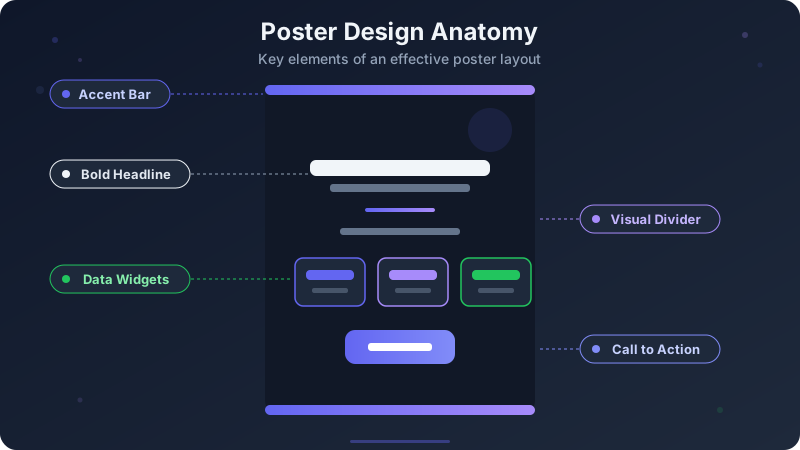
How to Design a Poster — Free Guide with Templates (2026)
Step-by-step guide to designing stunning posters. Covers layout, typography, color, and sizes. Free poster maker and templates included.
Read moreBuild a Full Infographic
Combine charts, timelines, stat cards, and 80+ widget types into a complete infographic.
Try the Full Editor