Flowchart Symbols Reference
Diagrams & FlowsQuick-reference guide to all flowchart symbols and their meanings. Learn what ovals, diamonds, rectangles, parallelograms, and other shapes mean in flow diagrams. Free printable cheat sheet.
Free PNGNo signupNo watermark
Loading tool...
Was this tool helpful?
Watch the Tutorial
Walk the terminator, process and decision shapes, then the data, document and storage families, filtering by family or searching by name and opening any figure for its spec and copyable SVG.
Want more customization?
Open the full editor with 80+ widgets, templates, and AI generation.
How to Use
- 1
Find the symbol you need
Browse the visual reference below — every standard flowchart symbol is listed with its name, shape, and meaning.
- 2
Learn when to use it
Each symbol includes usage examples and tips on when it is the right choice for your diagram.
- 3
Open the flowchart maker
Click "Build a Flowchart" to jump straight into the free editor with all these symbols available as nodes.
- 4
Add nodes to your flowchart
Select node types from the properties panel — process, decision, start/end, input/output, document, database, delay, and connector.
- 5
Export your flowchart
Download as a high-quality PNG — free, no watermark, no signup required.
Why Choose GraphMake?
Frequently Asked Questions
What are the 5 basic flowchart symbols?
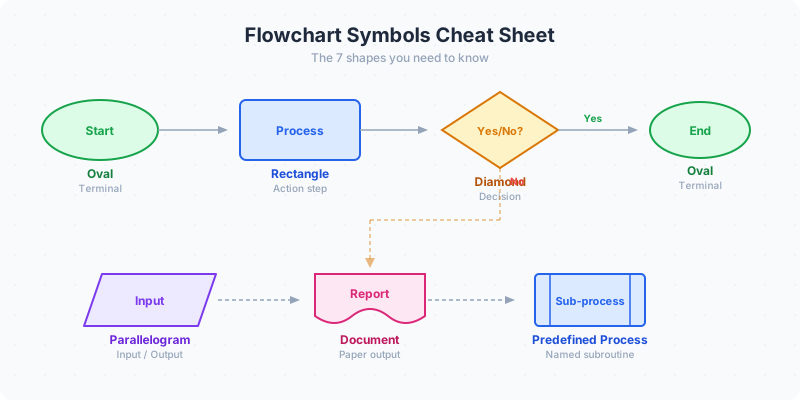
The five core symbols are: Oval (start/end), Rectangle (process step), Diamond (decision), Parallelogram (input/output), and Arrow (flow direction). These five cover 90% of all flowcharts.
What does a diamond mean in a flowchart?
A diamond represents a decision point — a yes/no question or condition that splits the flow into two or more paths. Always label the outgoing arrows with the conditions (Yes/No, True/False, or specific values).
What is the difference between a rectangle and a rounded rectangle?
A standard rectangle is a process step (an action). A rounded rectangle (or oval/pill shape) is a terminal — it marks where the process starts or ends. Some tools use rounded rectangles for subroutines or predefined processes.
What does a parallelogram mean in a flowchart?
A parallelogram represents input or output — data entering or leaving the process. Examples: "User enters password" (input), "Display report" (output), "Print invoice" (output).
What is the cylinder symbol in a flowchart?
A cylinder represents a database or data storage. Use it when your process reads from or writes to persistent storage — a database, file system, or data warehouse.
What flowchart symbol is used for a delay?
A D-shape (half-oval or half-pill) represents a delay or waiting period. Examples: "Wait for approval," "Hold for 24 hours," "Queue for processing."
What is a connector symbol?
A small circle with a label (letter or number) that links one part of a flowchart to another without drawing a long arrow. Use connectors when your flowchart spans multiple pages or when direct arrows would create tangles.
Are flowchart symbols standardized?
Yes — ISO 5807 and ANSI X3.5 define standard flowchart symbols. The core shapes (oval, rectangle, diamond, parallelogram, arrow) are identical across both standards. In practice, most teams use the core five without worrying about formal compliance.
Related Tools
Free Branching Flowchart Maker Online
Create branching flowcharts online for free. Use real decision diamonds, labeled Yes/No paths, 9 ANSI-style shape types, 4 visual themes, starter presets, and sharp PNG export. No signup, no watermark.
Try it freeFree Process Diagram Maker
Design clear process diagrams and step-by-step visuals online for free. Perfect for workflows, SOPs, tutorials, and onboarding guides. Export as PNG.
Try it freeFree Mind Map, Brainstorm & Idea Map Maker
Capture ideas visually with a mind map, brainstorm map, or idea map. Start from examples for projects, study notes, strategy, or content planning — free, no signup, no watermark.
Try it freeFree Org Chart Maker
Build organizational charts and organograms online for free. Visualize team structures, reporting lines, and company hierarchy. Export as PNG — no signup needed.
Try it freeLearn More
Flowchart Symbols Guide: Shapes, Meanings & Examples (2026)
Flowchart symbols defined with examples: oval start/end, rectangle process, diamond decision, parallelogram input/output, arrows, connectors, documents, and database shapes.
Read more
How to Make a Flowchart: A Step-by-Step Guide
Learn how to create clear, effective flowcharts for any process. Covers flowchart symbols, when to use flowcharts vs other diagrams, step-by-step instructions, examples, and design tips.
Read more
How to Make a Workflow Chart: Process Flow Guide
Learn how to create workflow charts that map out business processes, team handoffs, and operational flows. Step-by-step guide with examples, best practices, and a free workflow diagram maker.
Read moreBuild a Full Infographic
Combine charts, timelines, stat cards, and 80+ widget types into a complete infographic.
Try the Full Editor