Visual SOP Maker
Diagrams & FlowsTurn standard operating procedures into clear visual one-pagers. Process steps, checklists, role icons, decision branches. For training, posters, and customer-facing process docs. Free.
Free PNGNo signupNo watermark
Loading tool...
Was this tool helpful?
Watch the Tutorial
Type each step and its owner, colour by role so the handoffs stand out, turn a step into a branch where the procedure forks, then run it top-to-bottom or horizontal for a wall.
Want more customization?
Open the full editor with 80+ widgets, templates, and AI generation.
How to Use
- 1
Choose a direction
Horizontal or Vertical, in the Data panel.
- 2
Add steps and branches
Use Step to add to the flow and Branch for any Yes/No point.
- 3
Type on the page
Click any label on the SOP and type.
- 4
Add a pre-flight checklist
List what people must confirm before they start.
- 5
Style it
Clean, Tint, Gradient or Dark, and Colour by role to color steps by who owns them.
- 6
Download
Download PNG — free, no watermark.
Why Choose GraphMake?
Why visual SOPs work where written ones do not
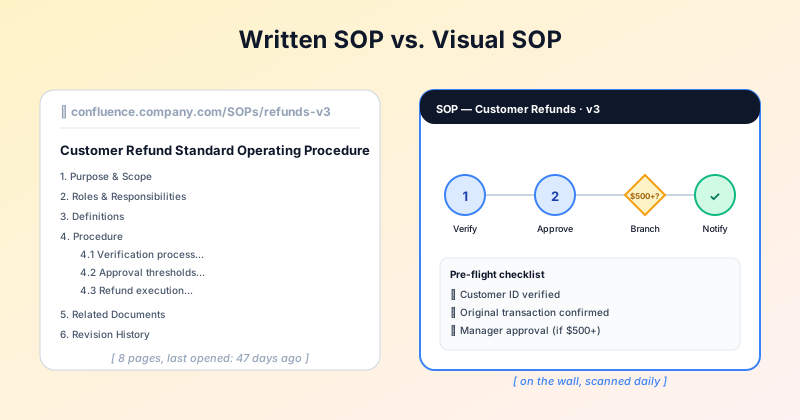
A standard operating procedure document is fine for the SOP library. It is the wrong artifact for the operations floor, the customer-facing help center, or the new-hire onboarding wall. People do not read 8-page documents while they are mid-task. They glance.
A visual one-page SOP — clear numbered steps, icons for roles, a decision branch where one is needed — gets used. The text-heavy version sits in Confluence unopened.
GraphMake gives you the visual format with no design skill required. Add steps, Yes/No branches and a pre-flight checklist, color the steps by role, and download one PNG for team channels or print.
Frequently Asked Questions
When should I use a visual SOP vs a written one?
Use a visual SOP when the audience scans rather than reads — operations floors, training posters, customer-facing process docs, frontline staff in noisy environments. Use a written SOP (Confluence, Notion, Word) when steps need conditional branches, compliance audit trails, or version history with paragraph-level edits. Many teams use both: a one-page visual on the wall + the full written SOP in the wiki.
How long should a visual SOP be?
One page (one canvas). If it does not fit on one page, the SOP is probably too complex for a visual format — split it into sub-procedures, each with its own visual one-pager, and link them from a master document.
Can I add a decision diamond / branching?
Yes — add a Branch in the Data panel for any Yes/No point. If your SOP is mostly decisions, the flowchart maker (/tools/flowchart-maker) is a better fit.
Can I export to PDF for printing?
No — the SOP downloads as a PNG image, free and without a watermark. Print the PNG directly, or place it in a document and save that as PDF.
Are there visual SOP templates?
A small set of process and how-it-works templates are in /templates that adapt well to SOP use. More SOP-specific templates are planned.
Can AI generate a visual SOP from a written procedure?
Yes: in the /editor, click AI Generate and paste your written procedure; the layout lands on your canvas, ready to edit. A free account includes 3 AI generations, and Pro includes more. Without an account, copy a prompt from the AI Prompts tab into ChatGPT or Claude together with your procedure, then paste the script into Import. See /script for the syntax.
Related Tools
Free Process Diagram Maker
Design clear process diagrams and step-by-step visuals online for free. Perfect for workflows, SOPs, tutorials, and onboarding guides. Export as PNG.
Try it freeFree Branching Flowchart Maker Online
Create branching flowcharts online for free. Use real decision diamonds, labeled Yes/No paths, 9 ANSI-style shape types, 4 visual themes, starter presets, and sharp PNG export. No signup, no watermark.
Try it freeFree Checklist Infographic Maker
Create grouped checklist infographics with phases, status icons, progress summaries, themes, canvas sizes, and PNG export. Free, no signup.
Try it freeLearn More
Visual SOP Templates: One-Page SOPs People Actually Read
Turn standard operating procedures into one-page visual SOPs. When to use a visual SOP vs a written one, the layout that works, and a free SOP template tool.
Read more
How to Make a Process Map: Step-by-Step Guide with Examples
Learn how to create a clear process map that documents workflows, identifies bottlenecks, and improves team efficiency. Free tool included — no signup needed.
Read more
How to Make a Flowchart: A Step-by-Step Guide
Learn how to create clear, effective flowcharts for any process. Covers flowchart symbols, when to use flowcharts vs other diagrams, step-by-step instructions, examples, and design tips.
Read moreBuild a Full Infographic
Combine charts, timelines, stat cards, and 80+ widget types into a complete infographic.
Try the Full Editor