What Is a Process Map
A process map is a visual diagram that shows every step in a workflow from start to finish. Unlike a simple checklist or SOP document, a process map reveals how steps connect — who does what, what happens next, and where the handoffs occur between people or systems.
Process maps are used across industries. Operations teams map order fulfillment and supply chain workflows. HR departments document onboarding and offboarding processes. Customer support teams outline ticket escalation paths. Software teams map deployment pipelines and incident response procedures.
The difference between a process map and a flowchart is mostly about audience and purpose. Flowcharts are general-purpose and often used in programming or logic design. Process maps focus specifically on business processes — they emphasize roles, departments, and real-world workflows rather than abstract logic.
When You Need a Process Map
Build a process map when a workflow involves three or more people and nobody can explain the full process from memory. If you hear "I think it goes to Sarah after that, but maybe procurement reviews it first," you need a process map.
Process maps are essential during audits and compliance reviews. ISO 9001, SOC 2, and HIPAA all require documented processes. A visual map satisfies auditors faster than a 20-page procedure manual because they can trace every step and exception in seconds.
They also expose bottlenecks. When you map a process end to end, you can see where work piles up, where approvals stall, and where handoffs create delays. A purchasing workflow that looks simple on paper might reveal five approval gates when mapped — and three of them might be redundant.
Types of Process Maps
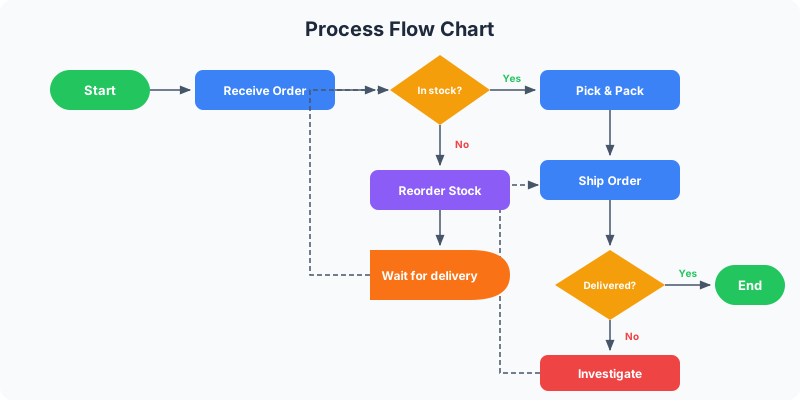
Basic flowchart process map: a linear sequence of steps from start to end using standard flowchart symbols — ovals for start/end, rectangles for tasks, diamonds for decisions. Best for simple processes with fewer than 15 steps and minimal branching. See flowchart symbols guide for the complete symbol reference.
Swimlane process map: divides the diagram into horizontal or vertical lanes, each representing a department, role, or system. Steps are placed in the lane of whoever is responsible. This is the most popular format for cross-functional workflows because it makes handoffs and ownership instantly visible.
Value stream map: a lean manufacturing tool that tracks both material and information flow. Each step includes metrics like cycle time, wait time, and defect rates. Used heavily in manufacturing, logistics, and DevOps to identify waste and optimize throughput.
SIPOC diagram: a high-level process map that identifies Suppliers, Inputs, Process steps, Outputs, and Customers. Think of it as a zoomed-out view before you build the detailed map. Useful for scoping a process improvement project or aligning stakeholders on boundaries.
How to Create a Process Map Step by Step
Step 1 — Define the scope. Pick the exact process you want to map and set clear boundaries. "Employee onboarding" is too broad. "New hire first-day setup from offer acceptance to system access" is specific enough to map cleanly. Write down the start trigger and the end state.
Step 2 — List every step. Walk through the process with the people who actually do the work. Not managers, not documentation — the people who touch the process daily. Write each step on a sticky note or in a simple list. Don't worry about order yet, just capture everything.
Step 3 — Sequence the steps. Arrange your steps in order. Identify which steps happen in parallel, which are sequential, and where decisions create branches. This is where you'll discover steps people forgot to mention and exceptions that "only happen sometimes."
Step 4 — Assign roles. For each step, note who is responsible. This is where a swimlane layout helps — if the process touches three departments, create three lanes and place each step in the correct lane. Handoffs between lanes are usually where delays happen.
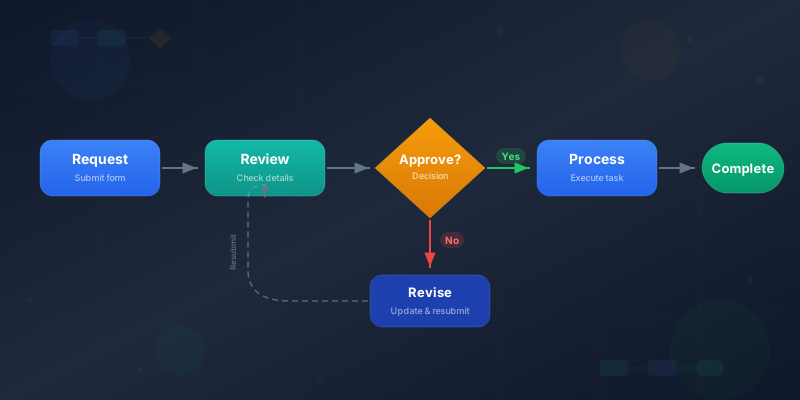
Step 5 — Add decisions and exceptions. Mark every point where the process branches. "Manager approves?" is a decision diamond with Yes and No paths. Don't skip the exception paths — they often take longer than the happy path and are where processes break down. If a section of your process is purely binary yes/no logic (like eligibility checks or troubleshooting), consider extracting it into a standalone decision tree — see how to make decision tree for guidance.
Step 6 — Build the visual. Open the process flow maker or the full editor to create your map digitally. Start with the happy path (the most common route through the process), then add branches and exceptions. Use color to distinguish departments or step types.
Step 7 — Validate with stakeholders. Show the completed map to everyone involved in the process. Ask: "Is anything missing? Is this the order things actually happen — not how they're supposed to happen?" Update based on feedback. A process map is only useful if it reflects reality.
Process Map Best Practices
Map what actually happens, not what should happen. The biggest mistake in process mapping is documenting the ideal process instead of the real one. If people routinely skip step 4 and go straight to step 6, your map should show that — then you can decide whether to fix the process or update the documentation.
Keep it to one page. If your process map requires scrolling or zooming to read, it's too detailed. Either break it into sub-processes (use the predefined process symbol to reference them) or zoom out to a higher level of abstraction. A map nobody reads is worse than no map at all.
Use consistent symbols. Stick with standard flowchart symbols — ovals for start/end, rectangles for tasks, diamonds for decisions, parallelograms for inputs/outputs. Don't invent custom shapes. Anyone who knows basic flowcharting should be able to read your process map without a legend.
Include timing where it matters. If a step takes 5 minutes but the approval that follows takes 3 days, that context matters. You don't need timestamps on every step, but flagging steps with long wait times helps identify optimization opportunities.
Version and date your maps. Processes change. Add a version number and date to every process map. When someone asks "is this current?" the date answers instantly. Review maps quarterly or after any significant process change.
Ready to build?
Open the free editor and start creating — no signup needed.
Process Map Examples
Customer support ticket escalation: Start → Customer submits ticket → Auto-assign to L1 → L1 resolves? → Yes → Close ticket → End. No → Escalate to L2 → L2 resolves? → Yes → Close → End. No → Escalate to engineering → Create bug ticket → End. Each level is a swimlane showing clear ownership.
Employee onboarding: Start → HR sends offer letter → Candidate accepts? → No → End. Yes → IT provisions accounts → Manager assigns buddy → HR schedules orientation → Employee completes Day 1 checklist → Manager holds week-1 check-in → End. The swimlanes show HR, IT, and Manager lanes.
Purchase order approval: Start → Employee submits request → Under $500? → Yes → Auto-approve → Notify purchasing → End. No → Manager reviews → Approved? → No → Return to employee → End. Yes → Over $5000? → Yes → VP approval → Finance review → End. No → Finance review → End.
These examples work well as templates. Open the editor and use the how it works template as a starting point, or build from scratch with the process flow and flowchart widgets.
Common Process Mapping Mistakes
Mapping in isolation. Don't sit alone at your desk and draw what you think happens. Process maps built without input from the people who do the work are fiction. Every time. Schedule a 30-minute walkthrough with the team before you start drawing.
Too much detail too soon. Start with 8-12 high-level steps. Once that's validated, you can drill into any step that needs more detail. Starting with 40 steps creates an unreadable diagram and exhausts stakeholders before you get useful feedback.
Ignoring exception paths. The happy path is easy to map. But processes break at the edges — what happens when the system is down, the approver is on vacation, or the data is incomplete? These exception paths are where the real value of process mapping lives.
Never updating. A process map from 2023 that doesn't reflect your current tools, team structure, or policies is misleading. Treat maps as living documents. Review them when roles change, tools change, or someone says "we don't do it that way anymore."
Build Your Process Map in GraphMake
The fastest way to get started is the process flow maker — add your steps, customize colors, and export as PNG in under a minute. For processes with decision branches, use the flowchart maker instead.
For a complete process map with swimlanes, icons, and annotations, open the full editor. Combine process step widgets, flowchart widgets, text blocks, and dividers to build a detailed map. The how it works template gives you a pre-built layout to customize.
Need to document multiple related processes? Create each one separately and link them using the predefined process symbol. Read how to make flowchart for a deep dive on flowchart-style mapping, or see how to make process flow chart for linear process flows.