Free Decision Tree Maker
Diagrams & FlowsBuild clear decision trees online for free. Add yes/no questions, map outcomes, and export as PNG. No signup, no watermark — perfect for business decisions, troubleshooting guides, and process logic.
Free PNGNo signupNo watermark
Loading tool...
Was this tool helpful?
Watch the Tutorial
Type the root question and its branches, give both answers their own follow-up, and see the tree re-flow itself across four layouts: classic, compact, sideways and path cards.
Want more customization?
Open the full editor with 80+ widgets, templates, and AI generation.
How to Use
- 1
Open the decision tree maker
Launch the free tool — works in any browser, no account needed.
- 2
Add decision questions
Type your yes/no questions. Each question branches into two outcomes.
- 3
Define outcomes
Fill in what happens for each Yes and No path — actions, next steps, or final results.
- 4
Preview your tree
See your decision tree rendered instantly with color-coded branches (green = yes, red = no).
- 5
Export
Download PNG — free, no watermark. Pro adds SVG, HD PNG at 2×, 3× and 4×, and an animated MP4.
Why Choose GraphMake?
Start from a Template
Jump-start your design with a ready-made layout — just replace the data.
Mission Control Decision Tree
A futuristic decision-tree template for strategic branching, build-vs-buy decisions, and high-contrast editorial logic maps.
Use this templateBuild vs Buy vs Partner
Free online decision tree generator template for the classic build-buy-partner question, with costs, timelines, risk scores, and a recommended path.
Use this templateHow It Works
A bold dark-loop process template walking through how it works in clear steps.
Use this templateFrequently Asked Questions
What is a decision tree?
A decision tree is a diagram that maps out a series of yes/no questions leading to different outcomes. It helps visualize decision-making logic, troubleshooting steps, or classification processes in a clear, branching structure.
When should I use a decision tree?
Use decision trees for troubleshooting guides ("Is the device on? Yes → Check settings. No → Turn it on"), business decisions (go/no-go criteria), customer support scripts, process flows with conditional logic, and any scenario with binary branching.
Can I make a decision tree with more than two branches?
This quick tool focuses on yes/no (binary) decisions. For multi-branch trees, open your design in the full /editor where you can use the flowchart or hierarchy widget with unlimited branches and custom labels.
How is a decision tree different from a flowchart?
A decision tree uses only binary (yes/no) branching from decision nodes, creating a tree structure. A flowchart can have multiple paths, loops, parallel processes, and various node types (process, input/output, delay). Decision trees are a specific subset of flowcharts. Try our /tools/flowchart-maker for more complex diagrams.
Can I export my decision tree?
Yes — Download PNG is free with no watermark. Pro adds a vector SVG, HD PNG at 2×, 3× and 4×, and an animated MP4.
Related Tools
Free Branching Flowchart Maker Online
Create branching flowcharts online for free. Use real decision diamonds, labeled Yes/No paths, 9 ANSI-style shape types, 4 visual themes, starter presets, and sharp PNG export. No signup, no watermark.
Try it freeFree Hierarchy Chart & Tree Diagram Maker
Build draggable hierarchy charts, tree diagrams, organograms, and taxonomy trees online. Nest unlimited levels, drag nodes into place, customize colors, and export as PNG — free, no signup, no watermark.
Try it freeFree Mind Map, Brainstorm & Idea Map Maker
Capture ideas visually with a mind map, brainstorm map, or idea map. Start from examples for projects, study notes, strategy, or content planning — free, no signup, no watermark.
Try it freeFree Process Diagram Maker
Design clear process diagrams and step-by-step visuals online for free. Perfect for workflows, SOPs, tutorials, and onboarding guides. Export as PNG.
Try it freeLearn More
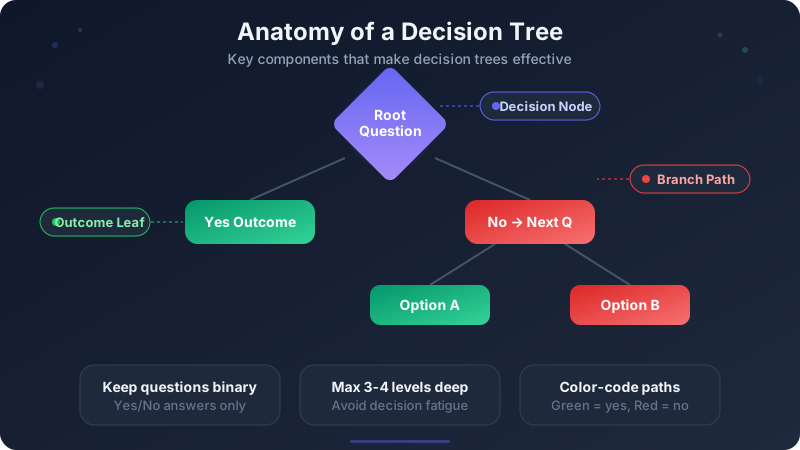
How to Make a Decision Tree — Free Guide with Examples (2026)
Create decision trees for free with our online decision tree maker. Step-by-step guide covering business decisions, troubleshooting trees, and process logic — with examples, templates, and instant PNG export.
Read more
How to Make a Flowchart: A Step-by-Step Guide
Learn how to create clear, effective flowcharts for any process. Covers flowchart symbols, when to use flowcharts vs other diagrams, step-by-step instructions, examples, and design tips.
Read more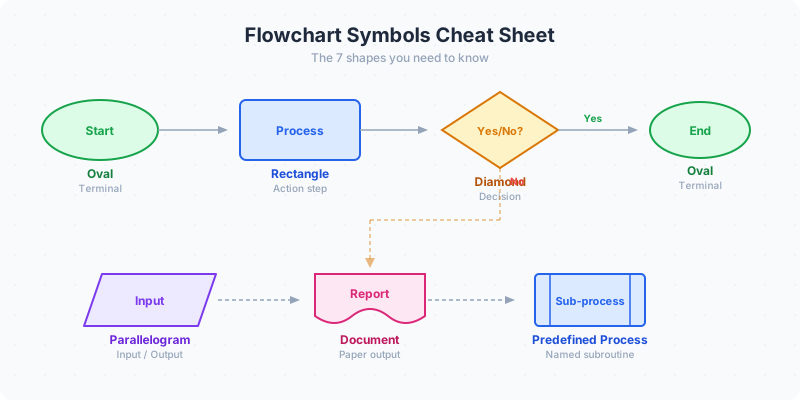
Flowchart Symbols Guide: Shapes, Meanings & Examples (2026)
Flowchart symbols defined with examples: oval start/end, rectangle process, diamond decision, parallelogram input/output, arrows, connectors, documents, and database shapes.
Read moreBuild a Full Infographic
Combine charts, timelines, stat cards, and 80+ widget types into a complete infographic.
Try the Full Editor